Project
Trip Chain: Building a Multi-Stop Transit Route Planner with Google Maps API
STACK: HTML5, CSS3, JavaScript, Google API
56% of workers in NYC use public transport to get around. I built an app that lets users optimize multi-stop public transport journeys.
Background
Public transit apps like Google Maps give you point-to-point directions, but real life is rarely that simple. For many people, the trip to or from work involves more than just two points; it’s a chain of errands, coffee stops, and school drop-offs. This type of travel behavior is called trip chaining.
Trip Chaining in the US
Around 30% of work-to-home commutes include at least one non-work stop (NHTS, 2001).
Women are more likely to trip chain than men, especially when household errands or children are involved.
In NYC, approximately 56% of workers use public transport to get to work, and women, immigrants, and lower-income workers all disproportionately depend on the subway and bus network.
Despite this, neither Google Maps nor Apple Maps offers the functionality to add stop-offs to public transport journeys. As someone who relies on public transport myself and who got tired of manually planning multi-stop trips, I decided to tackle this gap.
Trip Chain and Flexible Stops
Trip Chain is a web-based transit planner that helps you:
Map out multi-stop commutes using public transport
Search for businesses along the way
Compare alternative routes
What makes it unique is its flexible stop feature. Instead of finding a stop manually, you can type a category, like “pharmacy” or “coffee”. The app then chooses the best candidate along your route, based on minimizing extra travel time.
The App in Action
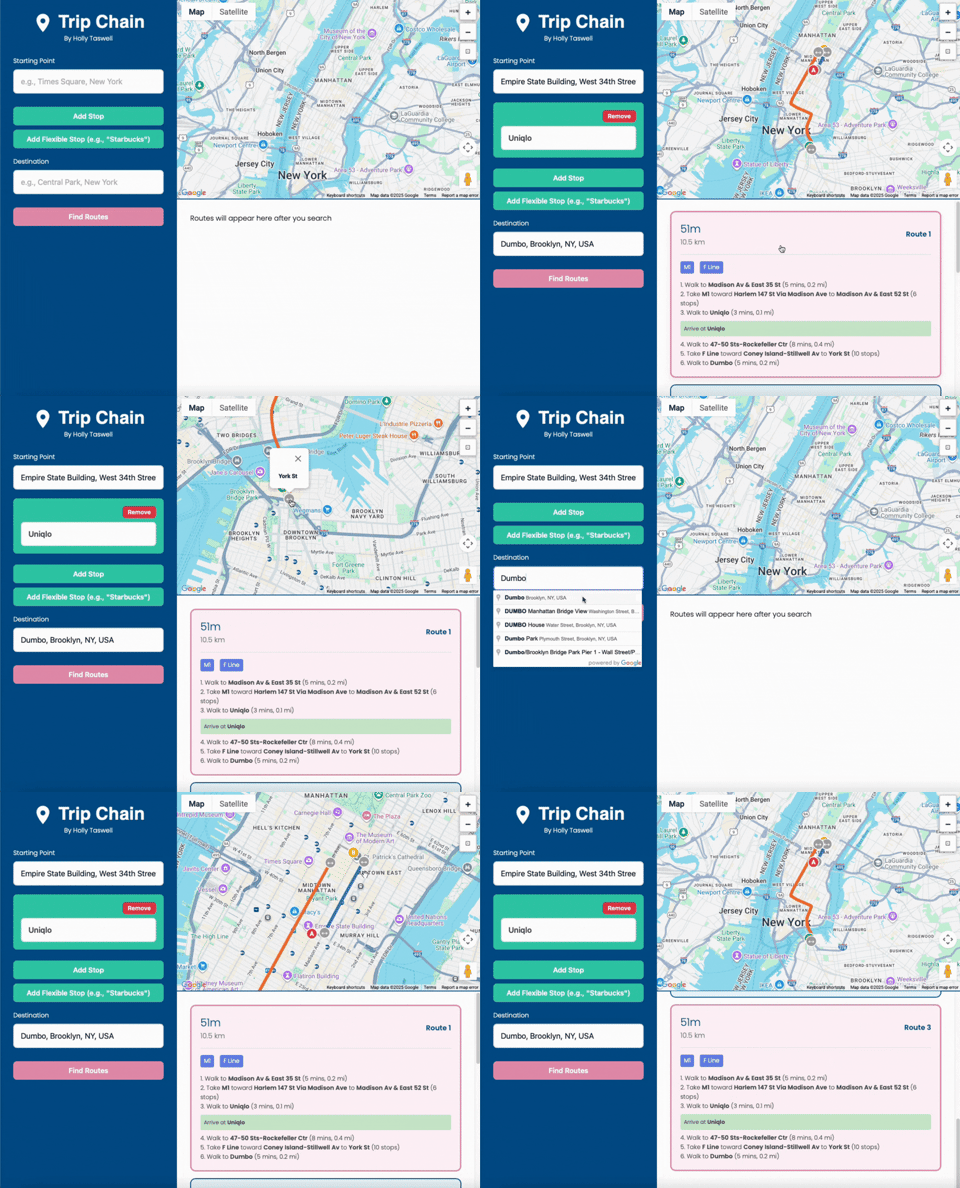
Below is an example of planning a journey from the Empire State Building in Manhattan to Dumbo in downtown Brooklyn, stopping at a Uniqlo on the way:
Route Options:
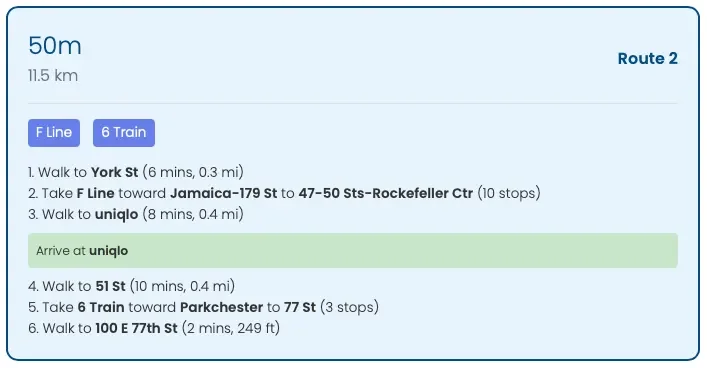
The application displays three route options to choose from, with clear instructions on how to navigate the journey:
Building Trip Chain
Technical Stack
Frontend: HTML5, CSS3, vanilla JavaScript
APIs: Google Maps JavaScript, Places, Directions, Geocoding
Typography: Neue Machina (headers), Poppins (body)
Layout: Flexbox and absolute positioning
Learning Curve with AI
As a Data Scientist who works predominantly in Python and SQL, I had no experience using HTML/CSS before this project. To bridge this gap, I leveraged AI vibe coding assistants:
Claude AI was excellent at building the foundational API structure of the HTML application. However, as the file grew more complex, Claude struggled to maintain consistency. With careful prompting and over 350 separate iterations, I pieced together working sections of code.
ChatGPT wasn’t as effective at directly writing large chunks of code, but it was invaluable for teaching. It explained why layouts were breaking, how CSS positioning worked, and how to troubleshoot errors on my own.
Both tools had limits. Persistent bugs, especially around CSS layouts, highlighted the need to understand fundamentals rather than paste in AI-generated fixes.
CSS Lessons Learned
Persistent issues that both AI models were unable to resolve revealed essential lessons about CSS layout systems:
Grid and flexbox can fail when parent containers have implicit constraints
Absolute positioning provides the most reliable results for complex multi-panel layouts
Z-index and positioning context must be carefully managed
Direct children of positioned containers behave more predictably than deeply nested elements
Handling Google Maps APIs
The APIs introduced their own challenges:
Managing multiple asynchronous requests at once
Rate-limiting to avoid throttling
Combining multi-leg routes without an exponential blow-up in combinations
The Algorithm (simplified)
When you add a flexible stop (e.g., “pharmacy”), the app works as follows:
Calculate the fastest direct route from start to end.
Search for candidate stop-offs along that path.
For each candidate, test how much longer the trip would take.
Keep only those that add less than ~20% to total travel time.
Pick the option with the shortest total time.
This aims to create a natural route, not a huge detour.
Future Developments
The app is still under development. In particular, the algorithm behind the route planner has the following developments planned:
Instead of choosing the fastest route first and then finding candidates, test candidates over the x fastest routes. This considers that a longer direct route might yield a shorter chained journey after adding a stop-off than the fastest direct route.
Ensure that the algorithm iterates across all route combinations when using multi-stop routes, not simply stacking additional stops onto previous optimized routes.
Increase candidate limit above 5, and store more than 3 options per journey leg (improves accuracy but significantly adds to computational load)
Add an ‘open-now’ toggle to only consider candidates where the business is open during the journey.
At this stage, Trip Chain is still untested outside of my development environment and remains a prototype.
Final Thoughts
Trip Chain was born out of a frustration with existing transit apps and grew into a full-stack project that combined APIs, design, and algorithm design.
Most importantly, it showed me how AI tools like Claude and ChatGPT can accelerate learning, but they can’t fully replace fundamental understanding, especially when dealing with tricky layouts or asynchronous API logic.
By blending curiosity, persistence, and AI-powered guidance, I created a working prototype of a tool that reflects how people really travel, not just how apps assume they do.